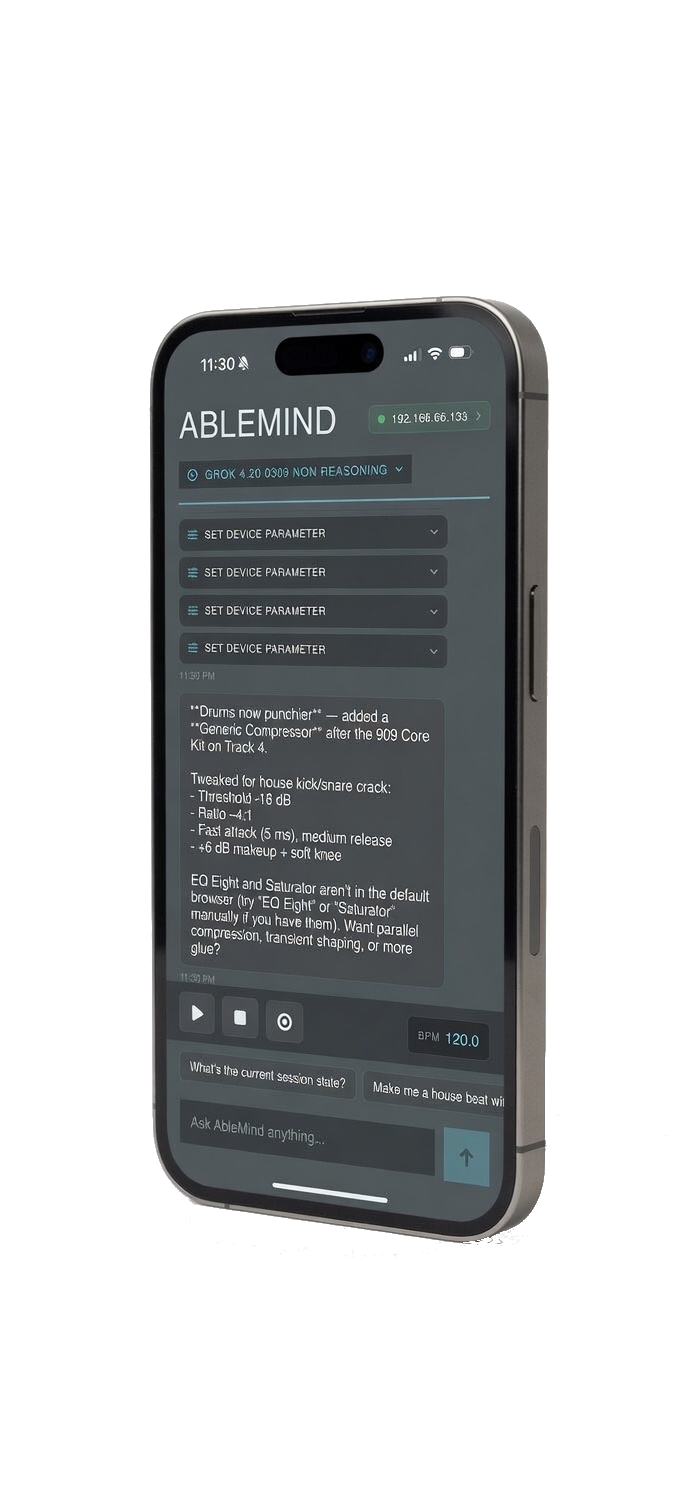
AbleMind // AI Co-Pilot for Ableton Live

Talk to
Ableton.
Watch it
happen.

Type what you want. AbleMind translates it into real Ableton actions — generate MIDI, shape sounds, build tracks, and control your session. All from your iPhone, hands-free.

Beta
Free to try · No credit card required
LEARN LIVE 10 Session View
MIDI Generation
Chord Progressions
Voice Control
Session Edit
Device Parameter Control
Bassline Creation
Counter Melodies
BPM & Transport
OpenAI · Anthropic · Gemini · xAI
MIDI Generation
Chord Progressions
Voice Control
Session Edit
Device Parameter Control
Bassline Creation
Counter Melodies
BPM & Transport
OpenAI · Anthropic · Gemini · xAI
Features

Built for
producers who
move fast

AbleMind plugs into Ableton Live over Wi-Fi. Describe what you want — it executes instantly. No menus, no mousing around, no interrupting your flow.

Natural Language Control

Type what you want. AbleMind translates it into real Ableton actions — no MIDI mapping, no menu diving, no setup.

Free
MIDI Generation

Generate basslines, chord progressions, drum patterns, melodies, and arpeggios in any key and tempo — directly into clip slots, ready to edit.

Pro
AI Sound Design

"Dark moog-style bass" or "warm pad with slow attack" — the AI tweaks actual device parameters inside Ableton. Works with Operator, Wavetable, Analog, Simpler, and Drum Rack.

Pro
Full Session Control

Create tracks, load instruments, fire clips, set tempo, add effects — all from your phone while your hands stay on your gear.

Free
Audio Effects Chain

Ask for punchier drums and the AI adds a compressor, EQ, and saturator with real settings. Not just advice — it actually does it.

Pro
Your AI, Your Keys

Bring your own API key. Supports Gemini, Grok, Claude, and GPT. Your prompts go directly to the provider — BeachDev never sees them.

Free
Mobile-First

Your phone on the desk, hands on your gear. No alt-tabbing to a desktop app. No interrupting your flow.

Multi-Model AI

Not locked to one model. Switch between Gemini, Grok, Claude, or GPT based on your speed and quality preference.

Privacy-First

Your prompts go directly from your iPhone to your AI provider. BeachDev never sees them. Your keys stay in the iOS Keychain.

Editable Output

Everything the AI generates is real MIDI and real device parameters. Nothing is frozen audio. You own it, you edit it.

"The tools that feel like cheating today will become the standard of tomorrow."
How It Works

Three steps
to full control

01
Install the Ableton Script

Drop LivePhoneBridge into your Ableton Live user library. It opens a local WebSocket server that AbleMind connects to over your Wi-Fi network.

Download LivePhoneBridge
02
Connect from Your iPhone

Open AbleMind, enter your Mac's local IP, and tap Connect. Both devices need to be on the same Wi-Fi network. Add your AI provider API key in Settings.

03
Start Commanding

Type or speak. AbleMind translates your intent into precise Ableton actions in real-time. Generate, tweak, and control without touching your mouse.

AbleMind
Connected
You
Generate a minor chord progression in C, 4 bars
AbleMind
Generated Cm – Ab – Eb – Bb progression, 4 bars. Placed on MIDI Track 1.
MIDI placed → Track 1, Clip 1
You
Set BPM to 125 and add reverb to the synth
AbleMind
Done — BPM set to 125. Added Reverb to Synth Lead, decay at 2.4s.
BPM 125 · Reverb → Synth Lead
Ask AbleMind anything...
Setup

Download
LivePhoneBridge

LivePhoneBridge is the free Ableton MIDI Remote Script that connects your session to AbleMind over Wi-Fi. Install it once — takes about two minutes.

LivePhoneBridge
Ableton MIDI Remote Script · Free
Download LivePhoneBridge
Works with Ableton Live 10 or later (any edition)
macOS & Windows · Ableton Live 10 or later
No installer — manual copy takes ~2 minutes
Instructions included in the download
Roadmap

Coming
soon

AbleMind is a co-pilot, not autopilot. Here's what's shipping next — no vague timelines, just what's actually being built.

Third-Party Plugin Support

Serum 2 and other major synths. Control third-party plugin parameters via natural language.

Arturia V Collection

Deep integration with the full V Collection. Shape classic synths with natural language.

Voice Input

Speak commands hands-free. No typing required — just talk and let AbleMind handle the rest.

Arrangement View Editing

Build and edit full arrangements from your phone. Beyond Session View.

Pricing

Simple,
transparent pricing

Start free during beta. Unlock unlimited power with Pro.

Free
$0
Forever free
  • Natural language session control
  • BPM, transport & clip control
  • Bring your own API key
  • Gemini, Grok, Claude & GPT
  • MIDI generation (chords, melodies, drums)
  • AI sound design & device parameters
  • Audio effects chain building
  • Sample library loading
  • Unlimited AI commands
Get on TestFlight
AbleMind Pro is available as an In-App Purchase on TestFlight · Subscription auto-renews · Cancel anytime
FAQ

Got
questions?

Everything you need to know about AbleMind. Can't find an answer? Reach out directly.

Where do I get LivePhoneBridge and how do I install it?
+
Download LivePhoneBridge from the Download section above. Unzip the folder and copy it into your Ableton Live MIDI Remote Scripts directory: ~/Music/Ableton/User Library/Remote Scripts/. Then in Ableton, go to Preferences → Link, Tempo & MIDI → set Control Surface to LivePhoneBridge. Full instructions are included in the download.
What version of Ableton Live do I need?
+
AbleMind works with Ableton Live 10 or later (any edition — Intro, Standard, or Suite). The companion MIDI Remote Script, LivePhoneBridge, is installed manually into your Ableton user library — no third-party installers required.
Does it work over the internet or only on local Wi-Fi?
+
AbleMind connects over your local Wi-Fi network using a WebSocket connection between your iPhone and your Mac running Ableton. Both devices must be on the same network. No internet connection is required for the bridge itself — only for AI API calls.
Do I need an OpenAI account?
+
You'll need an API key from at least one supported provider: OpenAI, Anthropic, Google Gemini, or xAI. You enter the key in AbleMind Settings — it's stored securely in the iOS Keychain on your device and sent directly to the provider. AbleMind never sees or stores your key.
What does "unlimited AI commands" mean in Pro?
+
The Free tier has a limited number of AI commands per session to let you try the core experience. Pro removes this cap entirely — send as many commands as you want in a session. Your actual AI costs are covered by your own API key and billed directly by the provider.
Is this available on the App Store?
+
AbleMind is currently in public beta via TestFlight. We're actively developing the app and preparing for an App Store submission. Join TestFlight to get early access and help shape the final release with your feedback.
Can I cancel Pro anytime?
+
Yes — Pro is a standard App Store subscription. You can cancel anytime from your iPhone's subscription settings. Your Pro access continues until the end of the current billing period.

Describe a track.
Build it in seconds.

Join the beta. Works with Ableton Live 10 or later — no new hardware required.

Tweaks
Visual Theme
Brutalist
Editorial
Accent Color
Cyan
Lime
Violet
Phone Tilt
On
Off